
Public feature voting sounds simple. Put ideas somewhere, let users vote, ship the best ones. Trello 2026 disagrees. Trello boards can be shared for viewing and comments, but Trello still does not provide a native “public users can create cards and vote” mode. That gap matters because the moment you fake it, you inherit spam control, identity, and data integrity problems.
Chapter 1 names the hard limits that block a true public voting board in Trello, including permissions and auditability. Chapter 2 shows a Trello-first roadmap setup that stays internal, because that’s what Trello is actually good at. Chapter 3 walks through the “public voting” hacks and why they fail under load, like webhook lag, duplicate submissions, and manual triage. Chapter 4 maps real alternatives, so you can stop duct-taping forms onto a Kanban tool and calling it strategy.
Why a Trello Roadmap Breaks Down for Public Feature Voting (Login Walls, No Notifications, Thin Moderation)

Your users show up with feedback, then hit a login wall. You end up copying votes from emails and DMs because the public board can’t capture intent without friction.
The biggest blocker for a public feature voting board in a Trello roadmap is simple: people need Trello accounts to vote. That requirement kills anonymous participation. It also filters out casual users who just want to click “+1” and move on. Trello can make a roadmap board public for visibility, but its voting is still described as limited versus purpose-built feedback tools. You can drag cards from “Idea” to “Planned” to “Shipped,” but most voters won’t reliably notice. They have to be logged in and paying attention. There’s no guarantee of email alerts when a status changes.
That missing notification loop creates busywork. Trello doesn’t ship a built-in changelog or automated status update notifications for voters. So once you collect votes, you still need manual updates and external comms to close the loop. Over time, your Trello roadmap turns into a read-only artifact. The real conversation moves elsewhere.
There’s also a product fit issue. Trello is designed for general project management, not public roadmap governance. Compared to tools like Fider or Frill, Trello lacks the advanced prioritization, analytics, and community moderation features those tools are built around. Fider, for example, supports anonymous voting on public boards. That is the tradeoff: Trello stays simple, but that simplicity caps public feedback workflows.
How Feedvote solves this Feedvote is built for public feature voting without asking users to create Trello accounts. It closes the loop with status updates and a cleaner voter experience. It also reduces the manual work of tracking who asked for what. If you’re currently trying to force Trello into this job, Feedvote is the better workflow because it’s designed for feedback collection and follow-up, not internal task tracking. See the broader setup patterns in this guide: introduction to Feedvote.
Chapter 2 — The Trello Roadmap Setup That Works (As Long As It Stays Internal, Not Public Voting)

Public voting breaks down fast when your Trello board is also your delivery system. You’ll either lock it down and lose real customer input, or open it up and spend your week cleaning up cards.
For a 2026 Trello roadmap that stays internal, start by picking a template that matches execution, not feedback. Trello’s Product Development Roadmap template fits teams tracking milestones, bug fixes, and release readiness. If you run work by dates and owners, Product Launch Checklist is a clean alternative. Either way, keep the board oriented around shipping.
A simple list structure holds up well: Backlog → To-Do → In Progress → Testing → Done, plus a dedicated Bugs list. This keeps feature work and fixes visible without mixing them into the same swimlane. The key is discipline: the Backlog is the master queue, and only “ready” items move into To-Do.
Use labels for priority (high/medium/low) or for functional buckets (front-end/back-end/UI). Labels let you scan without opening every card. Add due dates to force scheduling conversations, even if the date moves. Power-Ups like calendar and automation help with deadline visibility and reminders. Timeline-style views exist via Power-Ups, but Trello still lacks native Gantt and advanced dependency management, so keep dependency tracking lightweight and in comments.
Collaboration should happen on the card. Assign owners, write decisions in comments, and update during a weekly sync. This reduces side-channel coordination and keeps context near the work.
How Feedvote solves this Trello is strong for internal execution, but it isn’t built for public feature voting. Feedvote gives you a public-facing workflow for collecting and ranking requests, without letting strangers create chaos inside your delivery board. You keep Trello focused on building, while Feedvote handles intake and prioritization. When you’re ready to connect feedback to planning, start with Feedvote’s introduction and core workflow.
Chapter 3 — Trello Roadmap “Voting” Without Public Accounts: The Least-Bad Workarounds
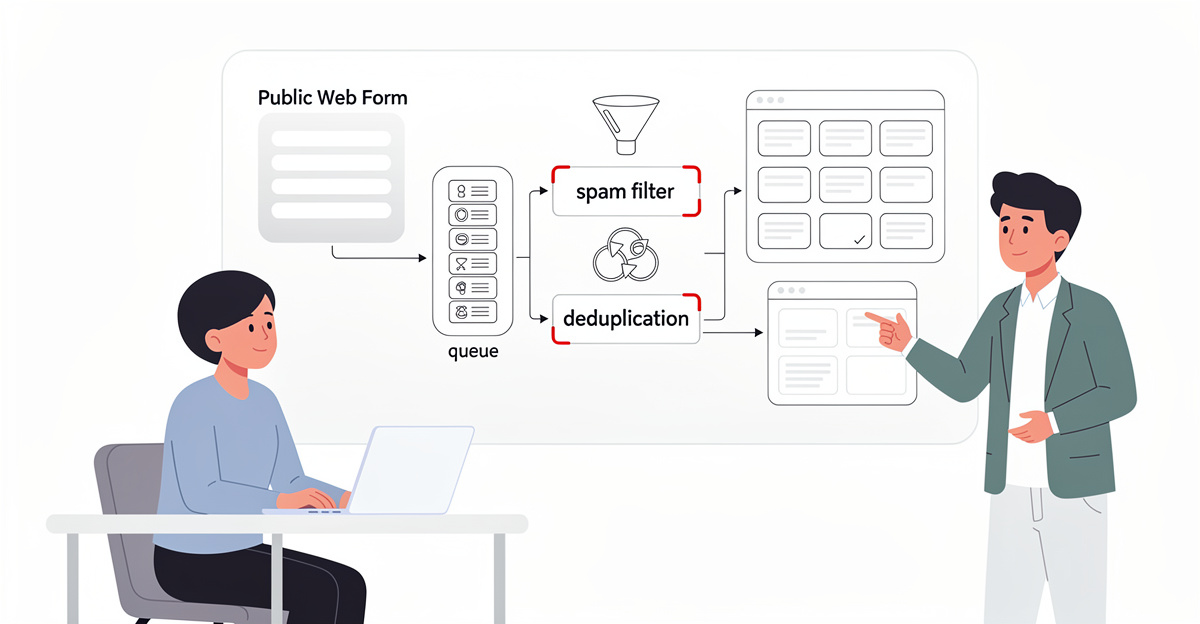
Your users won’t create Trello accounts just to upvote a card. If voting requires a third-party login, most people will bounce.
Trello 2026 is fine for an internal roadmap, like you set up in Chapter 2. But it’s a poor fit for public feature voting. The hard limit is simple: Trello doesn’t give you a real public voting board where anyone can create cards and vote without friction. The research is blunt: users need Trello accounts to vote, and asking people to create an account on a separate platform kills participation. Tools that support SSO, magic links, or Google sign-in avoid that drop-off. Trello doesn’t.
So the “least-bad” approximation is to treat Trello as the backend tracker, and collect votes somewhere else. In practice that means: (1) accept feature requests through a channel your users already use, (2) translate the signal into Trello cards, and (3) keep Trello read-only for the public. You can share a Trello board for visibility, and let people comment if you want discussion, but comments are not votes. You’ll also end up doing manual triage, deduping, and merging requests because Trello isn’t mediating intake.
This is why Trello works best for private or one-way roadmaps. It can show “what we’re doing,” but it’s not designed to collect prioritization data from the public.
How Feedvote solves this Feedvote is built for public feature voting without forcing a Trello account. It avoids the “separate account” trap that blocks engagement. You collect requests and votes in a purpose-built portal, then keep Trello as your execution system. That gives you a clean split: public signal in Feedvote, internal delivery in Trello. See the product overview: collect feedback the smart way with Feedvote.
Chapter 4 — Trello Roadmap Alternatives for Public Feature Voting (Avoid the Enterprise Feedback Swamp)

The Trello workaround breaks the moment users want to submit and vote without hand-holding. You end up moderating cards, policing duplicates, and explaining process instead of shipping.
Trello in 2026 still doesn’t give you a real public voting board. It can show cards and accept comments, but it won’t support interactive card creation and voting by public users out of the box. That’s why most teams move the “public input” step to a purpose-built feature voting board, then keep Trello as the internal execution system.
A public voting board fixes the core workflow problem: feedback arrives from tickets, email, Slack, and social posts, then gets lost or reworded. Centralizing requests turns opinions into demand you can measure. When one idea has 47 votes and another has 3, you stop guessing. Visible vote counts also drive participation, and comments add the why. “I need CSV export for weekly board reports” is prioritization fuel, not noise.
Before you pick a tool, decide your ground rules. Allow lightweight sign-in for submission and voting (Google or magic link) to reduce friction and block spam. Decide if vote counts stay public to encourage engagement, or hidden to avoid herd behavior. Keep comments on, because raw votes don’t explain constraints.
Tool-wise, lightweight options like Upvoty and Frill focus on public boards, roadmaps, and basic workflows. Mid-market systems like Featurebase, Nolt, UserVoice, and Savio add broader feedback management around voting. If you’re running a large public program, IdeaScale is built for community idea submission and configurable workflows, with integrations including Trello.
A practical pattern is hybrid voting: public voting for customers, plus an internal board where support, sales, and engineering vote too. When both groups align, priority is obvious.
How Feedvote solves this Feedvote gives you a public feature voting workflow without forcing you into a heavyweight enterprise system like UserVoice. Compared to Trello-only workarounds, it’s built for users to submit ideas, vote, and comment with low friction. Compared to general feedback suites like IdeaScale, it keeps the flow simple when your real goal is prioritization, not program management. If you also want a tighter roadmap loop, use Feedvote’s approach from this guide on building a public roadmap and keep Trello for delivery.
Final thoughts
Public voting is a product surface. Trello is a team surface. That mismatch is why a “Trello public voting board” turns into glue code, manual moderation, and broken expectations.
If you keep Trello, keep it internal. Use it for triage lanes, ownership, and delivery status. Make your public intake a separate system, because public identity, spam control, and deduplication are not Trello features. Then sync the output into Trello, or better, into a real dev tracker.
If you insist on public voting with Trello as the database, expect operational tax. You will build a form, a queue, a dedupe step, and a status mirror. You will also debug webhook drift and duplicate card creation. That is not “roadmapping.” That is running a small integration product.
Ship work, not workflow cosplay. Use Trello where it wins, and stop forcing it to be your public portal.
Stop duct-taping forms onto Trello. Switch to Feedvote today for a native public roadmap with voting, AI deduplication, and Linear sync—no Trello hacks required.
Learn more: https://feedvote.app
About us
Feedvote is a customer feedback and public roadmap platform designed for modern SaaS teams. It provides a public portal for collecting ideas and votes, handles deduplication with AI to reduce backlog noise, and syncs validated work into Linear so engineering execution stays in the system of record. Teams use it to replace brittle Trello voting workarounds with a real feedback pipeline, including public status updates and a clean separation between public intake and internal delivery.